On this page
Short answer: as text, 01101110 is the lowercase letter n — byte 110 in ASCII and UTF-8. As a number it is 110 (64 + 32 + 8 + 4 + 2), and in hex it is 6E. Unlike the strings in our earlier posts — 10101, which is too short to be a byte, and 11111111, which is not valid text at all — this one is a complete byte sitting squarely in the printable range, so the text reading is real.
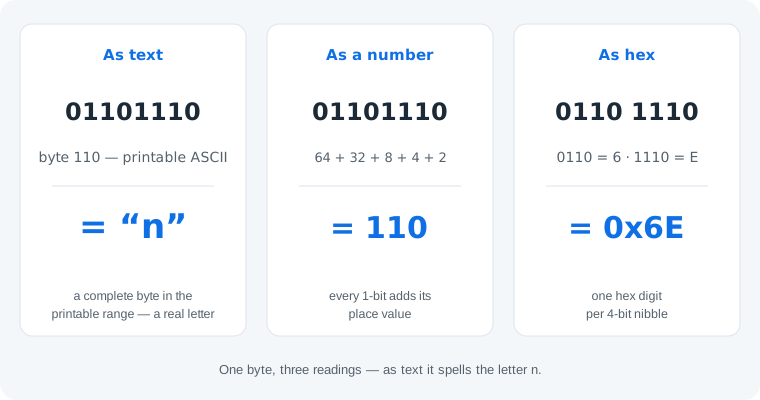
It Is the Letter n
Text on computers is bytes, and each byte is a number from 0 to 255 with a character assigned to it. Byte 110 is assigned to the lowercase letter n. Because 110 falls inside the printable ASCII window (32–126), 01101110 decodes to a visible character — no padding, no guessing, no ambiguity. If someone sent you a longer string of 0s and 1s and this byte appears in it, you are looking at one letter of a real message, and the binary alphabet table maps every other byte you will find alongside it.
Bit by Bit: 64 + 32 + 8 + 4 + 2
Each position in a byte is worth a power of two: 128, 64, 32, 16, 8, 4, 2, 1 from left to right. In 01101110 the 1s sit on 64, 32, 8, 4 and 2, which sum to 110. Note the leading 0: it holds the 128s place and contributes nothing — padding a number never changes it. The hex reading is even more mechanical: split into nibbles, 0110 is 6 and 1110 is 14 = E, so the byte is 0x6E.
The Lowercase Pattern: 011xxxxx
There is a shortcut worth memorizing: every lowercase ASCII letter starts with 011. The letters a through z occupy bytes 97–122, which in binary are 01100001 to 01111010 — the first three bits are always 011, and the last five bits are simply the letter's position in the alphabet (n is the 14th letter: 14 = 01110). Uppercase letters use 010 instead, which means N and n differ in exactly one bit — the third one — and 78 versus 110 is a difference of exactly 32. The full pattern with anchors is in how to read the binary alphabet.
One honest limit: a single byte is a fragment, not a message. 01101110 alone tells you “there is an n here” and nothing more — the word it belongs to lives in the bytes around it. Context also still decides: in a register dump the same byte is the number 110, not a letter.
How to Check Any Binary String
The five-step flow from our earlier posts, applied to this one:
- Count the bits. Eight — a complete byte, so text is possible. (Five bits, like 10101, cannot be text at all.)
- Convert to a byte value. 64 + 32 + 8 + 4 + 2 = 110.
- Check the printable window. Values 32–126 are printable characters; 110 qualifies.
- Look it up. 110 = lowercase n. Values 0–31 and 127 are control codes, and 128–255 are not ASCII at all.
- If the message is longer, decode the whole chain. One byte is one letter; paste the full string into the translator rather than decoding byte by byte.
Skip the lookup table
Paste any binary string into our binary code translator — it decodes complete bytes instantly and flags incomplete ones instead of guessing.
Open the translator with 01101110 pre-filledCommon Mistakes
- Mistake: stopping at the number.
01101110as a number is 110, but that is not the end of the story — correction: when the bit count is a multiple of 8, always try the text reading too. This byte is the letter n. - Mistake: mixing up
01101110and01001110. One bit apart, but n versus N — lowercase and uppercase. Correction: check the third bit: 1 is lowercase, 0 is uppercase (the values differ by 32). - Mistake: expecting a word from one byte. Correction: one byte is at most one character. If the string you received is longer, decode all of it together — byte-by-byte guessing loses the message.
Try It in the Translator
The CTA above opens our binary code translator with 01101110 already pasted: it reports one valid UTF-8 byte and decodes it to “n” — no ambiguity prompt this time, because a complete printable byte needs none. Try flipping the third bit to 0 (01001110) and watch the result become the capital N.
Practice
1. Decode 01101111. 64 + 32 + 8 + 4 + 2 + 1 = 111 — the letter o, one past n. (Byte 111 sits right after byte 110 in the alphabet.)
2. Which single bit turns n into N? The third bit: 01101110 → 01001110, changing 110 to 78. Flip it back and n returns.
3. What is 01100001? 97 — the start of the lowercase range, the letter a. From here you can count forward to any lowercase letter.
Frequently Asked Questions
What does 01101110 mean in binary?
As text, 01101110 is the lowercase letter n — byte 110 in ASCII and UTF-8. As a number it is 110 (64 + 32 + 8 + 4 + 2), and in hex it is 6E. It is a complete 8-bit byte, so all three readings are valid and context picks the one that matters.
Is 01101110 the letter n?
Yes. Byte 110 is the lowercase letter n in both ASCII and UTF-8. The value sits in the printable range (32–126), so unlike fragments or control codes, this byte decodes to a real, visible character.
What is 01101110 in decimal?
110. Add the place values that hold a 1: 64 + 32 + 8 + 4 + 2 = 110. The three leading bits 011 contribute only the 32 and 64 — the first bit is worth 128 but holds a 0.
What is 01101110 in hex?
6E. Split the byte into nibbles: 0110 is 6 and 1110 is 14, written E in hexadecimal. One hex digit per 4-bit group — no arithmetic needed.
What is uppercase N in binary?
01001110 (decimal 78). Uppercase N and lowercase n differ in exactly one bit — the third one: 0 makes it uppercase, 1 makes it lowercase. That single bit flips 78 into 110, a difference of 32.
Why do so many binary letters start with 011?
Because every lowercase ASCII letter from a to z lives in the range 01100001 to 01111010 (97–122). The first three bits 011 announce “lowercase letter”; the last five bits say which one. Uppercase letters use 010 instead.
Is 01101110 a complete message?
No — it is one byte, so at most one character. A full message is a chain of bytes like 01101110; paste the whole string into a binary translator to read all of it at once.
How do I decode a longer binary message?
Split the string into 8-bit groups, convert each group to its byte value, and read values 32–126 as printable ASCII characters. A converter does all three steps at once and flags incomplete groups instead of guessing.