On this page
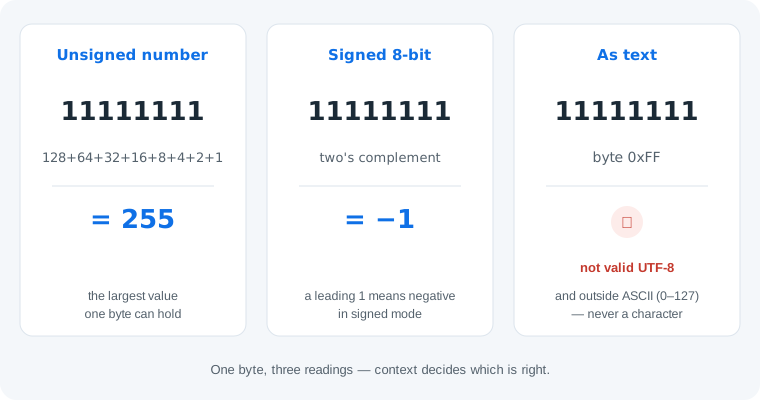
Short answer: as an unsigned binary number, 11111111 is 255 — the largest value one byte can hold. As a signed 8-bit number, the same bits are −1 (two's complement). As text, they are nothing: byte 0xFF is not valid UTF-8 and sits outside ASCII (0–127), so no character is defined. Three readings, one byte — context decides which is right.
Why 11111111 Is Not Text
Modern text is UTF-8, and UTF-8 never uses the byte 0xFF anywhere — not as a leading byte, not as a continuation byte. ASCII stops at 127, and 11111111 is 255, so there is no character to decode. It is not even valid BCD: split into nibbles, each 4-bit group reads 15, above the highest decimal digit 9 (our BCD converter flags exactly this case). The one historical exception is Latin-1, a legacy single-byte encoding that mapped 255 to ÿ — but no modern system writes text that way. If 11111111 shows up inside what you thought was a message, you are looking at binary file data, not text. The same number-versus-text trap is covered for a shorter string in what 10101 means, and the general rules are in binary numbers vs binary text.
Why 255 Is the Biggest Byte
A byte is exactly 8 bits, and each bit position carries a power of two: 128, 64, 32, 16, 8, 4, 2, 1. When every position holds a 1, the values stack to 128 + 64 + 32 + 16 + 8 + 4 + 2 + 1 = 255, which is 2⁸ − 1. There is no room to go further: adding 1 produces 100000000 (256), a number that needs a ninth bit. In a fixed 8-bit byte that ninth bit is lost, so the value overflows and wraps back to 00000000 — the reason old games and microcontrollers roll counters over at 255. If place values are new territory, how to read binary walks through them step by step.
The Signed Reading: −1
Many systems treat a byte as signed, using two's complement: a leading 1 marks a negative value, and the value is the unsigned reading minus 256. For 11111111 that is 255 − 256 = −1. Signed bytes run from −128 (10000000) up to 127 (01111111) — notice that 11111111 sits immediately below zero, which is why it is the classic representation of −1 in registers and memory dumps. Our binary to decimal converter shows both readings side by side — toggle the signed option to see −1.
One honest limit: the bits alone cannot tell you whether the sender meant 255 or −1. That choice lives in the system that produced the byte — its documentation, not the data. This is why our converter flags 11111111 as invalid text and shows the numeric readings instead of guessing a character.
How to Tell Which Reading Applies
Five checks settle it for any byte, not just this one:
- Where did the byte come from? A text file, a network dump, a game save, a math problem — the source usually answers everything.
- Try the text reading. If a UTF-8 decoder rejects the byte (as it must reject 0xFF), it was never text.
- Read it as an unsigned number. Add the place values: 11111111 → 255.
- Read it as a signed number. Leading 1 means negative: 255 − 256 → −1.
- Pick the reading the source system documents. Counters and color channels are unsigned; temperatures and deltas are usually signed.
Common Mistakes
- Mistake: expecting
11111111to be a letter. Correction: 255 is outside ASCII (0–127) and UTF-8 never uses 0xFF, so no modern encoding defines a character here. The legacy Latin-1 mapping to ÿ is history, not how text works today. - Mistake: saying
11111111is 256. Correction: eight 1s sum to 255 (2⁸ − 1). The number 256 is100000000— nine bits, one more than a byte can hold. - Mistake: ignoring the sign context. Correction: the same byte is 255 unsigned and −1 signed. Reading sensor data or save files with the wrong assumption flips every negative value into a huge positive one — check the system's documentation first.
Skip the guesswork
Paste any byte into our binary code translator — it flags invalid text bytes honestly and shows the numeric reading instead of inventing characters.
Open the translator with 11111111 pre-filledTry It in the Converter
The CTA above opens our binary code translator with 11111111 already pasted. The tool reports that the byte is not valid UTF-8 and not ASCII, and offers the numeric interpretation — 255 — rather than printing a made-up character. For the signed view, paste the same string into the binary to decimal converter and enable signed 8-bit mode: the result flips to −1 with the two's complement working shown step by step.
Practice
1. What is 01111111 as an unsigned number, a signed number, and as text? Unsigned: 127 (64 + 32 + 16 + 8 + 4 + 2 + 1). Signed: still 127 — the leading 0 means positive. As text: byte 127 is the DEL control character, not printable.
2. What is 11111111 + 1? 100000000 = 256 — a nine-bit number. Inside a fixed 8-bit byte the result overflows and wraps to 0.
3. Is 11111111 valid BCD? No. Split into nibbles: 1111 1111 — each group is 15, and BCD digits only run 0–9. Both groups are invalid.
Frequently Asked Questions
What does 11111111 mean in binary?
As an unsigned number, 11111111 is 255 — the largest value a byte can hold. As a signed 8-bit value it is −1, and as text it is nothing: byte 0xFF is not valid UTF-8 and lies outside ASCII (0–127).
Is 11111111 a letter in binary?
No. 11111111 is the number 255, which is outside the ASCII range of 0–127, and UTF-8 never uses the byte 0xFF at all — so no character is defined. Only the legacy Latin-1 encoding mapped it to ÿ.
Why is 11111111 the biggest byte?
Because a byte has exactly 8 bits and every place value is filled: 128 + 64 + 32 + 16 + 8 + 4 + 2 + 1 = 255, which is 2^8 − 1. Adding one more produces 100000000 (256), which needs a ninth bit.
What is 11111111 in decimal?
255 as an unsigned number. If the byte is signed (two's complement), the same bits mean −1 — the leading 1 marks a negative value.
What does 11111111 mean as a signed number?
−1. In 8-bit two's complement a leading 1 means negative, and the value works out to 255 − 256 = −1. Signed bytes run from −128 (10000000) to 127 (01111111).
Can 11111111 appear in a text message?
Not in modern text. UTF-8 never contains the byte 0xFF and ASCII stops at 127, so if 11111111 shows up inside what looks like text, the data is really binary (an image or a file) or uses a legacy encoding.
What is 01111111 in binary?
It is 127 — the largest signed byte value and the top of the ASCII range. As a text byte, 127 is the DEL control character, which is not printable.
What happens when you add 1 to 11111111?
You get 100000000, the number 256, which needs nine bits. In a fixed 8-bit byte the ninth bit is lost — the value overflows and wraps around to 00000000 (0).