On this page
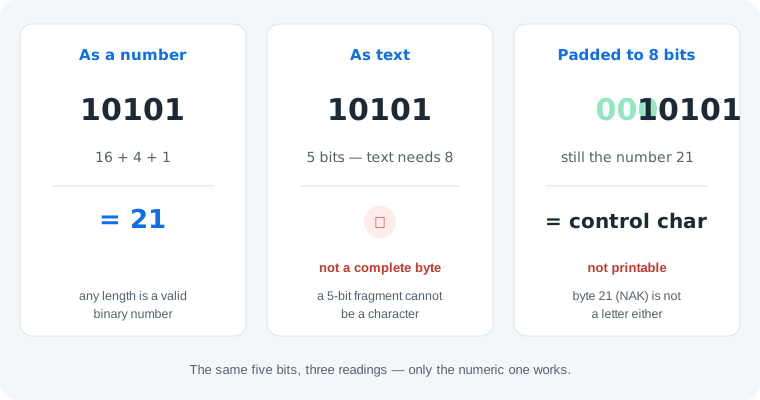
Short answer: as a binary number, 10101 is 21 (16 + 4 + 1). As text, it is nothing — text is stored in bytes of exactly 8 bits, and five bits is not a complete byte, so no character is defined. The same applies to shorter strings like 01001: as a number it is 9, as text it is still not a byte.
Why 10101 Is Not a Letter
Every text character occupies one byte — eight bits. 10101 has five. You could pad it with leading zeros to 00010101, but that is still the value 21, and byte 21 is a control character (NAK, “negative acknowledge”), not a printable letter. Printable ASCII characters start higher: 32 is the space, 65 is A, 97 is a. So no padding turns 10101 into a message — if you expected text, a bit was lost in copying.
How to Figure Out Any Binary String
The same five-step flow settles any mystery string of 0s and 1s:
- Count the bits. Ignore spaces and commas — they are formatting, not data.
- Is the count a multiple of 8? If yes, it can be text. If no, it cannot — full stop.
- Split into 8-bit groups. Each group is one byte, a number from 0 to 255.
- Decode the bytes. Values 32–126 are printable ASCII characters; anything else is a control code.
- If the decoding is gibberish, switch readings. Interpret the whole string as one binary number — or accept that it was never text (it might be image or file data) — even a complete byte can fail the text reading, and 11111111 is the classic case.
For 10101 the flow stops at step 2: five is not a multiple of eight. Reading it as a number instead gives 16 + 4 + 1 = 21, which is almost certainly what the sender meant. The deeper comparison of both readings is in binary numbers vs binary text.
One honest limit: this flow only sorts text from numbers. Binary that came from an image, a file or a sensor follows neither rule — it may decode to something that looks like text by pure chance, and no checklist can prove otherwise. When the source is unknown, treat any “message” with suspicion.
Common Mistakes with Short Binary Strings
- Mistake: padding
10101to force a letter.00010101is still the value 21 — a control character. Correction: padding completes the byte but cannot create a printable character; check the value against the printable range (32–126) first. - Mistake: assuming a short string is a letter because longer strings are. Correction: length is the whole test. Eight bits can be a byte; five bits cannot, no matter how the digits look.
- Mistake: trusting a converter that always prints something. Correction: a silent conversion is a guess. Honestly, no tool can know what the sender meant — ours refuses to guess and asks you instead, which is the only correct behavior for ambiguous input.
Skip the guesswork
Paste any string into our binary code translator — it flags incomplete bytes and offers the numeric reading instead of inventing letters.
Open the binary code translatorTry It in the Translator
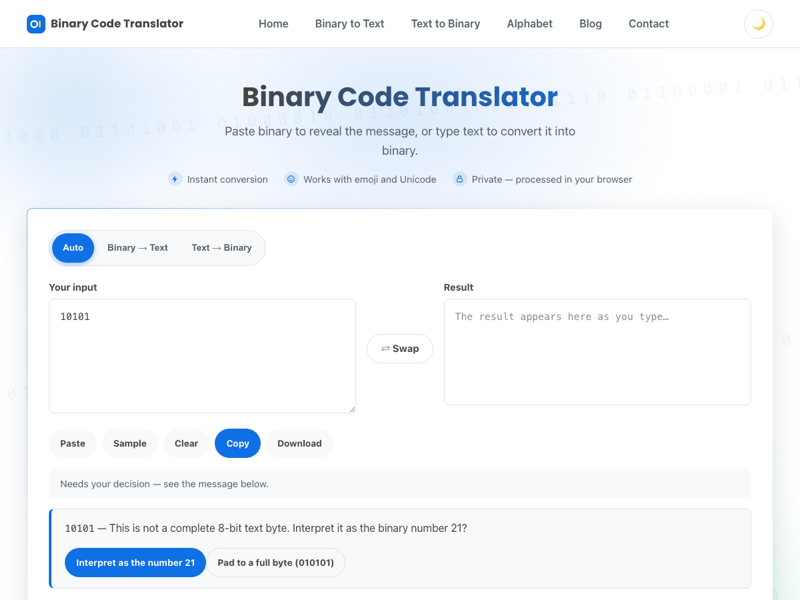
Paste the string into our binary code translator (that link pre-fills 10101 for you). Instead of guessing, the tool reports that the input is not a complete 8-bit byte and offers to interpret it as the number 21 — exactly the flow above, automated.
What About 01001?
Identical logic. As a number, 01001 is 8 + 1 = 9 (leading zeros never change a number). As text it is five bits, not a byte — and even padded to 00001001 the value 9 is the TAB control character, still nothing printable. When a complete byte does land in the printable range it really is a letter — 01101110, for example, is the letter n.
Practice
1. What is 10110 as a number — and as text? As a number: 16 + 4 + 2 = 22. As text: five bits is not a byte, so nothing — and padded to 00010110 the value 22 is another control character.
2. Is 01001000 a number or a letter? Both. Eight bits can be a complete byte, so context decides: as a number it is 72, and as a text byte 72 is the letter H. Verify either reading in the binary to text converter, or decode it yourself with our guide on reading binary by hand.
Frequently Asked Questions
What does 10101 mean in binary code?
As a binary number, 10101 is 21 (16 + 4 + 1). As text it means nothing: text is stored in 8-bit bytes, and five bits is not a complete byte, so no character is defined.
Is 10101 a letter in binary?
No. Even padded to a full byte as 00010101, the value 21 is a control character (NAK), not a printable letter. Printable ASCII letters start at 65 (01000001 is A).
How do I convert 10101 to text?
You cannot — five bits are not a complete byte. If the message looks like text, a bit was probably lost in copying; re-copy the original. If it came from a math context, read it as the number 21 instead.
What is 10101 in decimal?
21. Add the place values that hold a 1: 16 + 4 + 1 = 21. The leading position is worth 16, not 10 — binary place values are powers of 2.
What does 01001 mean in binary?
As a number, 01001 is 9 (8 + 1; the leading zero changes nothing). As text it is not a complete byte — five bits cannot hold a character, and padded to 00001001 the value 9 is the TAB control character.
Is 10101010 a letter in binary?
No. 10101010 is the number 170, which is outside the ASCII range of 0–127, and as UTF-8 a byte starting with 10 is a continuation byte that cannot appear alone — so it decodes to no character at all.
Can 10101 be part of a longer binary message?
Yes. The spaces in binary text are just formatting, so 10101 could be the tail of a longer byte sequence. Only the total bit count matters: if the whole string is a multiple of 8 bits, it may be text; if not, it cannot be.
Why is 10101 sometimes written 00010101?
That is the same value padded to a full 8-bit byte. Padding never changes a number — both are 21 — and since 21 is a control character (NAK), the padded form is still not a printable letter.