On this page
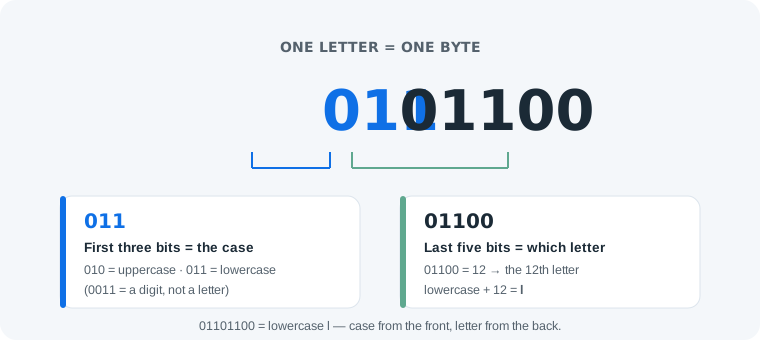
Reading a binary letter takes two steps: the first three bits of the byte tell you the case — 010 is uppercase, 011 is lowercase — and the last five bits tell you which letter, counting from 00001 (1 = A/a) up to 11010 (26 = Z/z). That is the entire skill. For example, 01101100 starts with 011 (lowercase) and ends with 01100 (12) — the 12th letter, l. Below: the two rules taught properly, the anchors that make them fast, and practice to lock them in.
The Two Rules, Slowly
The letter codes come from ASCII, which simply numbered the letters in order: A is 65, B is 66, through Z at 90, then a is 97 through z at 122. Written as 8-bit bytes, that numbering falls into a visible pattern. Uppercase bytes all start with 010, lowercase bytes all start with 011 — and the remaining five bits count the letters from 1 to 26. So the alphabet in binary is not 52 codes to memorize; it is counting to 26 in five bits, twice.
The five-bit tail is just binary counting: A/a is 00001, B/b is 00010, C/c is 00011, and so on up to Z/z at 11010. Read the tail as a small number from 1 to 26 and you have the letter’s position in the alphabet.
Look it up instead
The binary alphabet chart lists every letter and digit with search, and the binary code translator converts whole words as you type.
Open the binary alphabet chartMemory Anchors: Learn Five Letters, Derive the Rest
Counting from A every time is slow. Five anchors make it fast — know these positions and count up or down from the nearest one:
- A = 1 — so
01000001is A. The five bits00001are simply 1. - E = 5 —
00101. E is the most common letter in English, a natural anchor. - J = 10 —
01010. Halfway through the teens. - T = 20 —
10100. From T you can reach S, U, V, W in one step each. - Z = 26 —
11010. The last letter, the largest five-bit tail used.
To read 01110011: lowercase (011), tail 10011 = 19 — one step below T (20), so it is s. With anchors, most letters resolve in two seconds.
Digits and Punctuation at a Glance
Digits are not letters, and they get their own pattern: they start with 0011, and the last four bits are simply the digit’s value — 0 is 00110000, 9 is 00111001. A few punctuation marks worth recognizing: the space is 00100000 (32), ! is 00100001 (33), . is 00101110 (46) and ? is 00111111 (63). Everything else lives on the full chart.
Common Reading Mistakes
- Mistake: reading the whole byte as the letter’s number.
01100001is 97, which tells you nothing directly. Correction: only the last five bits carry the position —00001= 1 = a. The first three bits are the case marker, not part of the count. - Mistake: treating digits as letters.
00110001looks like a letter byte but starts with0011. Correction: the 0011 prefix means digit — the last four bits (0001) are the digit itself: 1. - Mistake: assuming the pattern covers every language. Correction: these two rules are ASCII English only. Chinese characters and emoji use multi-byte UTF-8, a different mechanism entirely — covered in what is UTF-8.
A Quick Self-Check
- Read the anchor letters without the chart: A, E, J, T, Z in both cases.
- Decode a two-letter word by hand — try
01101101 01101111. - Verify in the binary code translator: it should read “mo”.
- Write your own first name in binary, then convert it back to check every byte.
One honest limit: this pattern is a reading aid for English ASCII letters, nothing more. It will not help with numbers-as-numbers, with control characters, or with any text beyond English — for those, decode byte values and look them up properly.
Practice: Three Levels
1. Easy — decode 01101111. Starts with 011 (lowercase), tail 01111 = 15 — the 15th letter is o.
2. Medium — decode 01010100. Starts with 010 (uppercase), tail 10100 = 20 — the anchor letter T.
3. Challenge — decode 01001011 01101001 01101101. Byte by byte: uppercase + 11 = K, lowercase + 9 = i, lowercase + 13 = m. The name is “Kim”.
Frequently Asked Questions
How do you read the binary alphabet?
In two steps: the first three bits of the byte tell you the case (010 is uppercase, 011 is lowercase), and the last five bits are the letter’s position in the alphabet, from 00001 (A/a) to 11010 (Z/z). For example 01100001 is lowercase + 1 = a.
What is 01000001 in the binary alphabet?
01000001 is the uppercase letter A — decimal 65 in ASCII. The first three bits 010 mark uppercase, and the last five bits 00001 are position 1.
Do I need to memorize the whole binary alphabet?
No. The two rules do the work: case from the first three bits, letter position from the last five. Memorizing three anchors — A = 1, E = 5, T = 20 — lets you derive any other letter by counting.
What is the difference between uppercase and lowercase letters in binary?
Exactly one bit. Uppercase and lowercase forms are 32 apart in ASCII — A is 65 and a is 97 — so their bytes differ only in the third bit: 01000001 versus 01100001.
What is 00110000 in binary?
00110000 is the digit 0 — decimal 48. Digits are not letters: they start with 0011, and the last four bits are simply the digit’s value (0000 for 0 up to 1001 for 9).
Can the binary alphabet represent Chinese characters or emoji?
No. The two-rule pattern only covers English letters in ASCII. Characters like 你 or 👋 need multi-byte UTF-8 encoding, which works on a completely different mechanism.
How many characters can one byte represent?
One byte holds 256 values (0–255). The printable ASCII range 32–126 covers 95 characters — both letter cases, all ten digits and the common punctuation marks.
Is the binary alphabet the same thing as ASCII?
The letters are the ASCII codes, yes — but ASCII is bigger than the alphabet. It also assigns numbers to digits, punctuation and control characters like Tab and Line Feed.