On this page
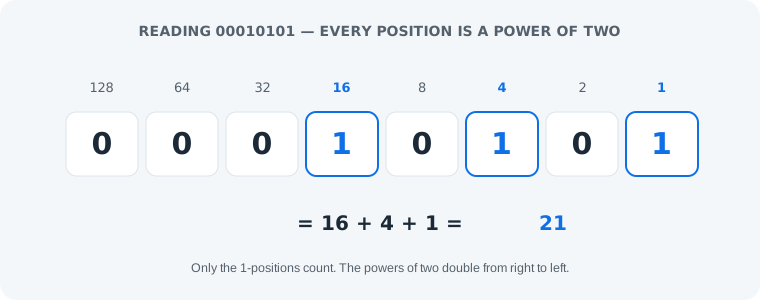
Binary numbers work on one rule: every digit is a power of two, doubling from right to left — 1, 2, 4, 8, 16 and so on — and counting rolls over at 2 instead of 10. To read a binary number, add the place values wherever you see a 1: 00010101 is 16 + 4 + 1 = 21. That single rule covers reading, writing and even adding binary numbers; the rest of this article is practice with it.
The One Rule: Every Digit Is a Power of Two
Decimal gives each digit ten possible values (0–9) and powers of ten as place values. Binary gives each digit two possible values (0 and 1) and powers of two. So the rightmost bit is worth 1, the next 2, then 4, 8, 16, 32, 64, 128 — double every step to the left. A bit set to 1 means “add this position’s value”; a 0 adds nothing. There is nothing else to learn.
Counting in Binary: Rollover at 2
Counting works exactly like decimal, just with a smaller alphabet. After 9 decimal rolls over to 10; in binary the rollover comes after 1: 0, 1, then 10 (which is 2), 11 (3), 100 (4). Every time a position would reach 2, it resets to 0 and carries 1 to the left — that is why 1 + 1 = 10 in binary. It looks wrong only until you remember the place is worth two.
Check any number instantly
Paste a binary string into our binary code translator — short fragments like 10101 get read as numbers, complete bytes get decoded as text.
Binary vs Decimal: 0 to 16 Side by Side
The rollover rhythm is easiest to see in a table. Watch how each power of two — 2, 4, 8, 16 — adds a digit:
| Decimal | Binary |
|---|---|
| 0 | 0 |
| 1 | 1 |
| 2 | 10 |
| 3 | 11 |
| 4 | 100 |
| 5 | 101 |
| 6 | 110 |
| 7 | 111 |
| 8 | 1000 |
| 9 | 1001 |
| 10 | 1010 |
| 11 | 1011 |
| 12 | 1100 |
| 13 | 1101 |
| 14 | 1110 |
| 15 | 1111 |
| 16 | 10000 |
Reading Bigger Numbers: Bytes and Beyond
Eight bits make a byte, holding 0 to 255 — 11111111 is 255, the largest byte. Bigger numbers just extend the same row of powers: 256, 512, 1024. And 1024 has a famously clean pattern — it is exactly 2¹⁰, so in binary it is a 1 followed by ten zeros: 10000000000. Powers of two always look like that, which is why computer memory sizes (512, 1024, 2048) are never round decimal numbers.
Quick Binary Arithmetic
Addition uses the same carrying you learned in school, with the rollover at 2. Try 5 + 3: 0101 + 0011. Rightmost column: 1 + 1 = 0, carry 1. Next: 0 + 1 + 1 = 0, carry 1. Next: 1 + 0 + 1 = 0, carry 1. Leftmost: 0 + 0 + 1 = 1. The result is 1000 — which is 8, and 5 + 3 really is 8. Every other operation builds on this one.
Why Computers Count in Binary
Computer hardware is built from switches that are either on or off, and two states map perfectly onto 1 and 0. Two-state circuits are cheap, fast and almost impossible to confuse electrically — so every count inside a computer happens in base 2. The broader story of why binary won is in what is binary code; this article is about the numbers themselves.
Common Mistakes
- Mistake: reading the place values from the left.
1101read left-to-right as “1, 2, 4, 8” gives the wrong sum. Correction: the smallest value (1) is always the rightmost bit — count from the right and double going left. - Mistake: treating a number string as text.
10101is 21, not a letter. Correction: text needs complete 8-bit bytes; anything shorter is a number. The full distinction is in binary numbers vs binary text. - Mistake: thinking leading zeros change the value. Correction: for numbers they do not —
0101and101are both 5. Leading zeros only matter when the same bits are meant as text, where bytes must be exactly 8 bits.
One honest limit: this article covers whole numbers only. Fractions (0.5 is 0.1 in binary) and negative numbers (usually stored with two’s complement) follow extra conventions that deserve their own guide — the place-value rule here will not decode them on its own.
Practice
1. Read 1101. The 1s sit at 8, 4 and 1 → 8 + 4 + 1 = 13.
2. Write 42 in binary. 32 fits, leaving 10; 8 fits, leaving 2; 2 fits. Positions 32, 8 and 2 are 1: 101010.
3. Challenge — add 0110 + 0110. That is 6 + 6. Column by column: 0+0=0; 1+1=0 carry 1; 1+1+1=1 carry 1; 0+0+1=1 — the result is 1100 = 12. Verify any of these with the place-value table above or the translator.
Frequently Asked Questions
How do binary numbers work?
Every digit in a binary number is a power of two, doubling from right to left: 1, 2, 4, 8, 16 and so on. To read a number, add the place values wherever you see a 1 — so 00010101 is 16 + 4 + 1 = 21.
How do you read a binary number?
Start from the rightmost digit, which is worth 1, and double the value of each position moving left. Add the values of the positions that hold a 1. For 1101 that is 8 + 4 + 1 = 13.
What is 1024 in binary?
1024 in binary is 10000000000 — a 1 followed by ten zeros. 1024 is exactly 2 to the power of 10, which is why it becomes such a clean binary pattern.
Is 10 in binary the number ten?
No — 10 in binary is the number 2. The left 1 sits in the twos place and the 0 in the ones place: 2 + 0 = 2. The number ten is written 1010 in binary.
What is 11111111 in decimal?
11111111 in decimal is 255 — the largest value one byte can hold. All eight positions are 1: 128 + 64 + 32 + 16 + 8 + 4 + 2 + 1 = 255.
What is 0.5 in binary?
0.5 in binary is 0.1 — the first digit after the binary point is the halves place. Fractions use place values like 1/2, 1/4 and 1/8, which is a separate topic from the whole numbers this article covers.
Can binary represent negative numbers?
Yes — most systems use two’s complement, which reserves the leading bit as a sign. That convention is about how computers store arithmetic, and it is beyond the scope of this article’s plain counting method.
Why do computers use binary numbers?
Because their hardware only needs to tell two electrical states apart — on and off, or 1 and 0. Two-state switches are cheap, fast and reliable, so every count inside a computer happens in base 2.