On this page
Short answer: writing your name in binary means turning each letter into its 8-bit byte and joining the bytes in order. “Maya” is 01001101 01100001 01111001 01100001 — four letters, four bytes. You can get your own name in one second with the text to binary converter, or learn the three-step hand method below and understand exactly what those 0s and 1s are doing. (Worked examples below use the common demo names “Maya” and “Alex” — not any real person's data.)
The Fast Way
Type your name into the text to binary converter and the binary appears as you type — copy or download it, done. That is the whole task if all you wanted was the result. The rest of this article is for the part the tool cannot give you: understanding what you just made, and being able to write it with a pencil when no computer is nearby.
The Three-Step Method
Every letter of your name goes through the same three steps:
- Find the letter's number. Its position in the alphabet (A=1, B=2, …, M=13), or its ASCII code from the binary alphabet chart (A=65, a=97).
- Set the case prefix. Uppercase letters start with
010, lowercase with011. (The classic alternative is the divide-by-2 method on the ASCII number — same bytes, longer road.) - Write the position as five bits and join. M is the 13th letter: 13 is
01101, so M is010+01101=01001101.
Repeat per letter, keep the order, and the bytes of your name line up left to right.
Worked Example: “Maya”
Four letters, four bytes — watch each one form:
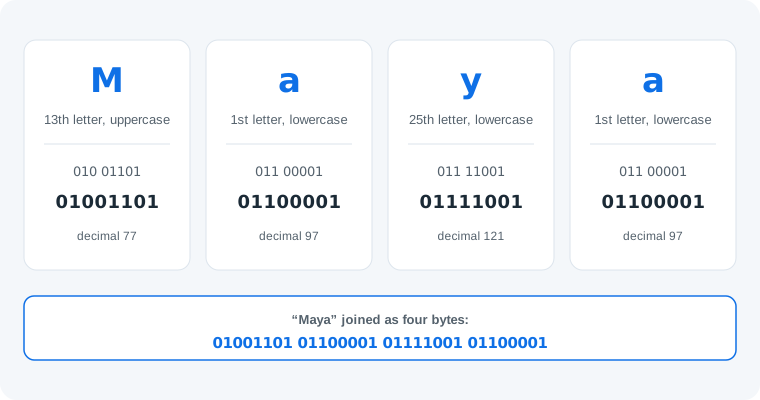
Joined together: 01001101 01100001 01111001 01100001. The lowercase a appears twice and gets the same byte twice — 01100001 — because binary encoding has no memory: the same character is always the same byte.
Capitals, Spaces and Everything Between
- Capitalization is data. M is
01001101but m is01101101— one bit flips (the third), worth 32 in decimal. Write your name with the capitalization you want back. - Spaces are characters. A space is a full byte,
00100000(decimal 32). “Mary Ann” is 8 bytes, not 7 — drop the space and it decodes as “MaryAnn”. - Hyphens and apostrophes count too. A hyphen is
00101101(45), an apostrophe00100111(39) — they appear in the string in exactly the positions you wrote them.
One honest limit: this method covers English-alphabet names. Accented and non-Latin characters live outside ASCII — in UTF-8, é takes two bytes and a Chinese character takes three. The method is identical (each character becomes its bytes), only the byte count per character changes; the variable-length mechanics are in what is UTF-8.
Your name, your binary — one second
Skip the pencil: type your name into the text to binary converter and copy the bytes. Then come back and check the first byte by hand to prove you could have done it yourself.
Open the text to binary converterShare It So They Can Read It
A binary name is a message only if the other person can decode it. Two options: send the string plus a link to the binary code translator, so they can paste and read it — or send a link that decodes itself. This site's translator accepts the input in the URL: /#input=01001101%2001100001%2001111001%2001100001 opens with “Maya”'s bytes already pasted and decoded on arrival. Write your name, paste the bytes into that link shape, and the person you send it to sees your name the moment the page loads.
Common Mistakes
- Mistake: dropping leading zeros. M is
01001101, not1001101— correction: every character is exactly 8 bits; a short byte shifts everything after it and the message breaks. - Mistake: forgetting the space byte. Correction: spaces are characters (
00100000). Count characters including spaces before you start, and the byte count must match. - Mistake: mixing case bytes. Copying a capital-M byte for a lowercase m changes the letter your reader sees. Correction: the third bit is the case bit —
010uppercase,011lowercase; keep it consistent with what you wrote.
Practice
1. Write “Alex” in binary. A = 010 + 1 (00001) = 01000001; l is the 12th letter, lowercase: 011 01100 = 01101100; e is 5th: 01100101; x is 24th: 01111000. Answer: 01000001 01101100 01100101 01111000.
2. Decode 01001101. 010 says uppercase; 01101 is 13; the 13th letter is M.
3. How many bytes is “Mary Ann”? 8 — seven letters plus one space byte (00100000). Count again if you got 7.
Frequently Asked Questions
How do I write my name in binary?
Turn each letter into its 8-bit byte and join the bytes in order. Each letter has a fixed code (M is 01001101, a is 01100001), so “Maya” becomes 01001101 01100001 01111001 01100001. A converter does it instantly; doing it by hand takes three steps per letter.
How many bytes is a name in binary?
One byte per character in English — “Maya” is 4 bytes, “Alex” is 4 bytes, and a two-part name like “Mary Ann” is 8 bytes because the space counts as a full character (00100000). Every byte is 8 bits, so multiply the character count by 8 for the bit count.
Are capital and lowercase letters different in binary?
Yes — exactly one bit apart. Uppercase letters start with 010 and lowercase with 011, so A is 01000001 and a is 01100001. Write your name with the same capitalization you want back; changing case changes the bytes.
What about spaces, hyphens and apostrophes in a name?
They are full characters with their own bytes: a space is 00100000, a hyphen is 00101101, an apostrophe is 00100111. Include them in order and the name decodes exactly as written — drop the space and “Mary Ann” comes back as “MaryAnn”.
Can I write a non-English name in binary?
Yes, but those letters are outside ASCII and take multiple bytes in UTF-8 — é takes two bytes, Chinese characters three. The method is identical (each character becomes its bytes); only the byte count per character changes.
How does the other person read my binary name?
They paste the string into a binary translator, which decodes the bytes back to letters. The neatest trick: send a link with the code pre-filled (this site's translator accepts #input= in the URL) so the message decodes itself on arrival.