On this page
“I love you” in binary is:
01001001 00100000 01101100 01101111 01110110 01100101 00100000 01111001 01101111 01110101
Copy it and send it as-is. It looks long because binary spends one 8-bit byte per character: ten characters — eight letters and two spaces — become ten bytes. Each byte is simply the character’s ASCII code written in base 2.
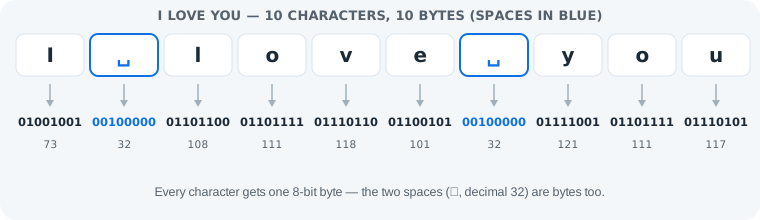
“I Love You” in Binary, Character by Character
Every byte in the message, decoded. The two spaces are full bytes (decimal 32) — the most commonly dropped piece.
| Character | Binary | Decimal |
|---|---|---|
| I | 01001001 | 73 |
| (space) | 00100000 | 32 |
| l | 01101100 | 108 |
| o | 01101111 | 111 |
| v | 01110110 | 118 |
| e | 01100101 | 101 |
| (space) | 00100000 | 32 |
| y | 01111001 | 121 |
| o | 01101111 | 111 |
| u | 01110101 | 117 |
Uppercase vs Lowercase: One Bit Apart
Write it with a lowercase i and only the first byte changes: 01001001 (I, 73) becomes 01101001 (i, 105). The two forms of every letter are exactly 32 apart, which in binary is a single bit — the third one from the left. Everything after that first byte is identical either way.
Make yours in one second
Our binary code translator converts any message as you type — this link even pre-fills “I love you” for you.
Open the translator with “I love you”Fun Variants to Send
- The text-art heart —
<3is two bytes:00111100 00110011. Shorter, cuter, same trick. - 143 — the classic pager code: 1 letter, 4 letters, 3 letters. It is numeric shorthand, not binary — do not convert the digits 1, 4, 3 into bytes unless you mean the characters.
- The emoji upgrade — ❤ in binary is
11100010 10011101 10100100(three UTF-8 bytes). Append it to the message for the full effect.
More Short Messages in Binary
The same one-byte-per-character trick, ready to copy. Every string in this table is generated and verified against the translator's own engine — no hand-typing, no typos.
| Message | Binary | Bytes |
|---|---|---|
| Hi | 01001000 01101001 | 2 |
| OK | 01001111 01001011 | 2 |
| Yes | 01011001 01100101 01110011 | 3 |
| No | 01001110 01101111 | 2 |
| Love | 01001100 01101111 01110110 01100101 | 4 |
| Miss you | 01001101 01101001 01110011 01110011 00100000 01111001 01101111 01110101 | 8 |
| Good luck | 01000111 01101111 01101111 01100100 00100000 01101100 01110101 01100011 01101011 | 9 |
Notice the pattern: “Hi” and “OK” are just two bytes each, while “Miss you” and “Good luck” spend a full byte on their space (00100000). To make your own variation, type any short message into the binary code translator — and if you send one of these strings to someone, include the translator link so they can actually read it. A binary love note only works if the other person can decode it.
How to Decode a Binary Love Note You Received
- Copy the whole string — spaces, line breaks and all.
- Paste it into the binary code translator. Formatting is cleaned automatically and reported.
- Read the message. If the tool flags an incomplete byte, a bit was lost in copying — re-copy the original.
- Reply in kind: type your answer, convert it, send the bytes back.
One honest limit: the person you send this to still needs a translator to read it — binary is romantic, not self-explanatory. Send the link to this article (or the translator) along with the bytes.
Common Mistakes
- Mistake: dropping the space bytes. Without the two
00100000bytes, “I love you” becomes “Iloveyou”. Correction: spaces are characters — eight letters plus two spaces means ten bytes, not eight. - Mistake: copying a lowercase version of a reference string.
01101001decodes to i, not I. Correction: check the case bit — uppercase letters start with010, lowercase with011. - Mistake: trusting a partial paste. If the bit count is not a multiple of 8, a bit was lost. Correction: a good tool flags the exact broken group instead of guessing — re-copy before trusting the output.
How to Verify Yours
- Convert “I love you” with the tool and compare against the string at the top of this page, byte for byte.
- Count the bytes: exactly ten groups of eight.
- Decode your string back — it must return “I love you” with both spaces intact.
- Spot-check one letter against the binary alphabet chart, for example y = 121 =
01111001.
Practice
1. What is 00100000? Decimal 32 — the space. It appears twice in “I love you”.
2. Decode the first byte of the message, 01001001. 64 + 8 + 1 = 73, and ASCII 73 is the letter I. The place-value method is in our guide to reading binary by hand.
Frequently Asked Questions
What is “I love you” in binary?
“I love you” in binary is 01001001 00100000 01101100 01101111 01110110 01100101 00100000 01111001 01101111 01110101. That is ten bytes — one per character, including the two spaces (00100000).
How many bytes is “I love you” in binary?
Ten bytes. Eight letters plus two spaces, and every character takes exactly one 8-bit byte in UTF-8 — spaces included.
Is “i love you” different from “I love you” in binary?
Only the first byte changes. Lowercase i is 01101001 (105) while uppercase I is 01001001 (73) — exactly 32 apart, a single bit. Every other byte is identical.
What does 143 mean in texting?
143 means “I love you” by letter count: I has 1 letter, love has 4, you has 3. It is numeric shorthand, not binary — the binary version of the same message is 80 digits long.
What does <3 look like in binary?
<3 in binary is 00111100 00110011 — two bytes: “<” is decimal 60 and “3” is decimal 51. It is the text-art heart, two characters with no emoji involved.
Can I add a heart emoji to the binary message?
Yes. ❤ is three UTF-8 bytes: 11100010 10011101 10100100. Emoji take more bytes than letters, but the converter handles them exactly the same way.
What is the binary code for a space?
A space is 00100000 in binary — decimal 32. It is a full character and takes one byte, which is why “I love you” contains it twice between the words.
How do I read a binary message someone sent me?
Paste it into a binary code translator and it decodes instantly — spaces and line breaks in the paste are cleaned automatically. To reply in kind, type your answer and convert it the other way.