On this page
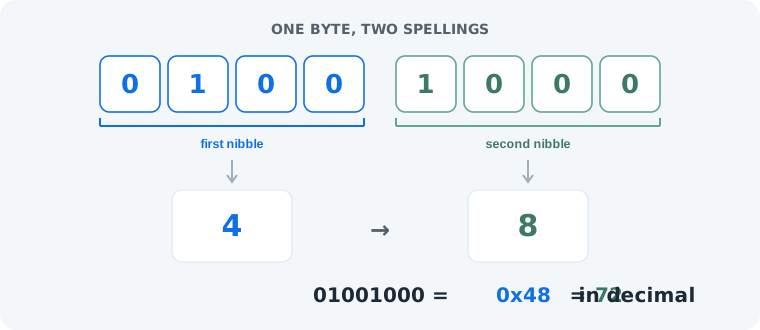
Binary and hexadecimal are two spellings of the same values. Binary is the machine’s language — every digit is one physical switch, off or on. Hexadecimal is the compact human shorthand — one hex digit stands for exactly four binary digits, because 16 = 2⁴. Same byte, two notations: 01001000 in binary is 0x48 in hex, and both are 72 in decimal. Nothing about the value changes — only how it is written.
The Core Difference
Binary stores one bit of information per digit: a 0 or a 1, one switch. Hexadecimal stores four bits per digit, using sixteen symbols — 0–9 then A for 10 through F for 15. That four-to-one compression is the whole reason hex exists: a byte of binary is eight characters long, but only two in hex. A kilobyte printed in binary is over eight thousand digits; in hex it fits on a page.
Binary vs Hexadecimal at a Glance
| Binary | Hexadecimal | |
|---|---|---|
| Base | 2 | 16 |
| Digits | 0, 1 | 0–9, A–F |
| Information per digit | 1 bit | 4 bits (one nibble) |
| One byte looks like | 01001000 | 48 |
| Typical prefix | 0b | 0x or # (colors) |
| Typical use | Machine storage, bit flags, teaching | Memory addresses, color codes, debugging |
When to Use Which
Reach for binary when individual bits carry meaning: learning how computers work, hardware registers, bit flags and masks — there, the pattern of 0s and 1s is the information. Reach for hex whenever a human has to read or type the value: memory addresses, color codes like #0F70E6, byte dumps and error codes like 0xDEADBEEF.
One honest limit of hex: it compresses away the very thing binary makes visible. If you need to know whether bit 3 is set, 0x48 makes you unpack it mentally — 01001000 shows it directly. Hex is for reading values, not for reading bits.
See any value in both notations
Our binary to hex converter shows the same bytes as binary and hex side by side — paste anything and compare.
Open the binary to hex converterConverting Between Them
The nibble trick makes conversion mechanical: group the bits into fours and read each group as one hex digit — 0100 is 4, 1000 is 8, so 01001000 becomes 0x48. Try it live with “Hi”: in binary it is 01001000 01101001, and in hex the same two bytes are 48 69. Our converter pre-fills that example if you open it with “Hi” in binary. The place-value math behind both notations is covered in how binary numbers work.
Common Mistakes
- Mistake: thinking hex is another encoding. Correction: hex is notation, not encoding. ASCII and UTF-8 decide which bytes a character becomes; hex only respells those bytes.
0x48, 72 and01001000are the same byte. - Mistake: worrying about letter case. Correction:
0xF6and0xf6are identical. Case is convention, not content. - Mistake: grouping by 8 when reading hex. Correction: hex digits line up with 4-bit nibbles, not bytes — split
11110110into1111and0110first, then read F and 6.
Practice
1. What is 1010 in hex? Four bits already form one nibble: 1010 = 10 = A.
2. What is 0x2F in binary? 2 is 0010, F is 1111 → 00101111 (decimal 47).
3. Challenge — write “Hi” in hex. The bytes are 01001000 01101001; nibble by nibble that is 48 69. Check it with the converter above.
Frequently Asked Questions
What is the difference between binary and hexadecimal?
Binary is base 2 (digits 0 and 1); hexadecimal is base 16 (digits 0–9 and A–F). Because 16 is 2 to the power of 4, one hex digit always stands for exactly four bits — so 01001000 in binary is 48 in hex. Both write the same value; only the notation differs.
Is hexadecimal an encoding?
No. Hex is notation — a way to write numbers. Encodings like ASCII and UTF-8 decide which bytes a character becomes; hex only changes how those bytes are written down. 0x48, 72 and 01001000 are the same byte.
Why does one hex digit equal exactly four bits?
Because hexadecimal is base 16 and 16 = 2⁴. Sixteen patterns fit in four bits (0000 to 1111), so every hex digit 0–F maps to exactly one 4-bit group, and one byte is always two hex digits.
Is 0xFF the same as 11111111?
Yes — both are the decimal value 255. 0xFF is the hex spelling: F is 15, and 15 × 16 + 15 = 255. In binary that is eight 1s: 11111111.
Do uppercase and lowercase hex letters matter?
No. 0xF6 and 0xf6 are the same value. Case is pure convention — style guides and documentation usually pick uppercase, C code often uses lowercase.
When should I use hex instead of binary?
Use hex whenever a human has to read or type the value: memory addresses, color codes, byte dumps. Use binary when individual bits matter — flags, masks and hardware registers — because hex hides the bit pattern.
What does 0x mean in front of a number?
The 0x prefix marks hexadecimal, so 0x48 means the hex value 48 — decimal 72. It is a C-style convention and carries no value itself, just like the 0b prefix on binary.
How do I convert binary to hex?
Group the bits into 4-bit nibbles and replace each with one hex digit: 0100 is 4 and 1000 is 8, so 01001000 becomes 0x48. A converter does this instantly for any length of input.